Überall beschriften.
IPTC-konform.
In Sekunden.
Caption anywhere.
IPTC-compliant.
In seconds.
PicDeploy liest und schreibt echte IPTC- und EXIF-Felder direkt auf deinem iPhone oder iPad. Titel, Beschreibung, Fotograf, Copyright, Schlagworte — startklar für Kunden, Agenturen und Bildarchive, ganz ohne Mac oder Profi-Bearbeitungsprogramme.
PicDeploy reads and writes real IPTC and EXIF fields right on your iPhone or iPad. Title, caption, photographer, copyright, keywords — ready for clients, agencies and archives, no Mac or pro editing software required.
Gebaut für Fotograf:innen unterwegs: Sportfotografie, Events, Reportage — überall dort, wo Bilder schnell mit korrekten IPTC-Angaben an Kund:innen oder Redaktionen raus müssen, aber kein Rechner in der Nähe ist.
Built for photographers on the go: sports, events, reportage — anywhere images need to go out fast with correct IPTC data, but there's no computer nearby.
So geht's
How it works
Vom Foto zur fertigen Lieferung in drei Schritten.
From photo to delivery in three steps.
Ganze Serien auf einmal — oder jedes Bild einzeln, wenn es darauf ankommt.
Whole series at once — or each image individually when it matters.
Fotos wählen
Pick photos
Aus der Fotomediathek oder der Dateien-App importieren — eine einzelne Aufnahme oder die komplette Serie vom Termin.
Import from your photo library or the Files app — a single shot or the complete series from the shoot.
Beschriften
Caption
IPTC-Preset anwenden oder Felder für die ganze Serie ausfüllen. Einzelne Bilder lassen sich gezielt nachbearbeiten.
Apply an IPTC preset or fill in fields for the whole series. Individual images can be fine-tuned separately.
Exportieren
Export
Größe, Wasserzeichen und Dateiname festlegen — und ab aufs Gerät, in iCloud Drive oder einen eigenen Ordner.
Set size, watermark and file name — then save to your device, iCloud Drive or a custom folder.
Funktionen
Features
Alles, was ein Bild für die Abgabe braucht.
Everything an image needs for delivery.
Metadaten, Wasserzeichen, Größe und Dateiname — in einer App, in einem Durchgang.
Metadata, watermark, size and file name — in one app, in one pass.
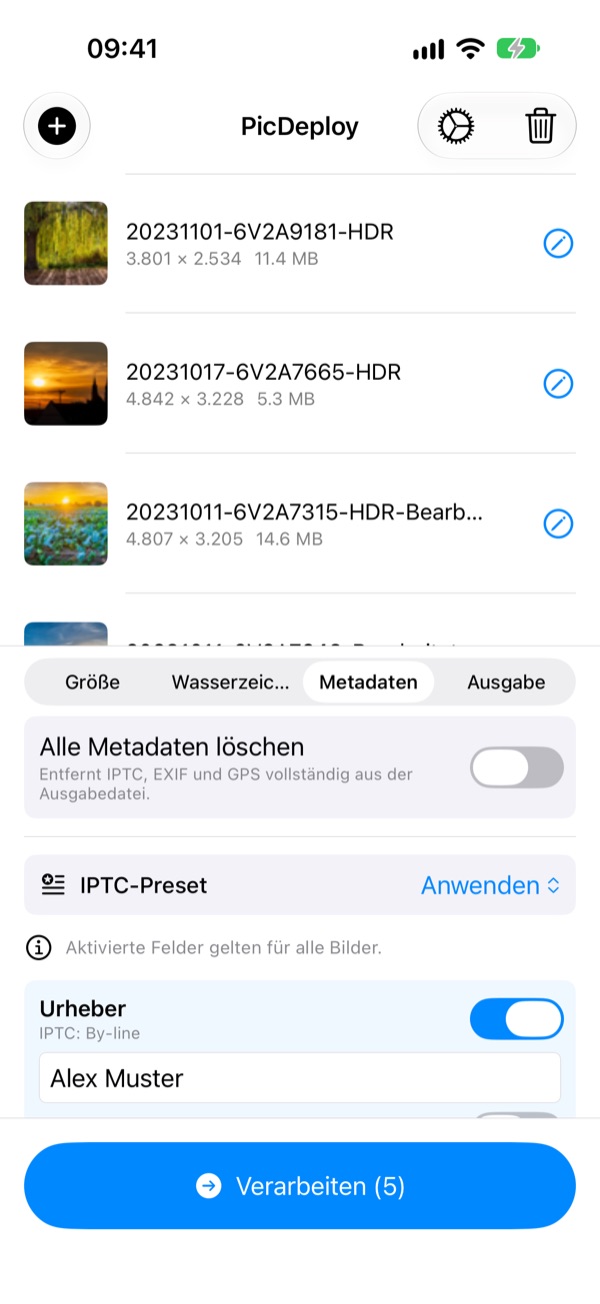
IPTC & EXIF. Lesen und schreiben.
IPTC & EXIF. Read and write.
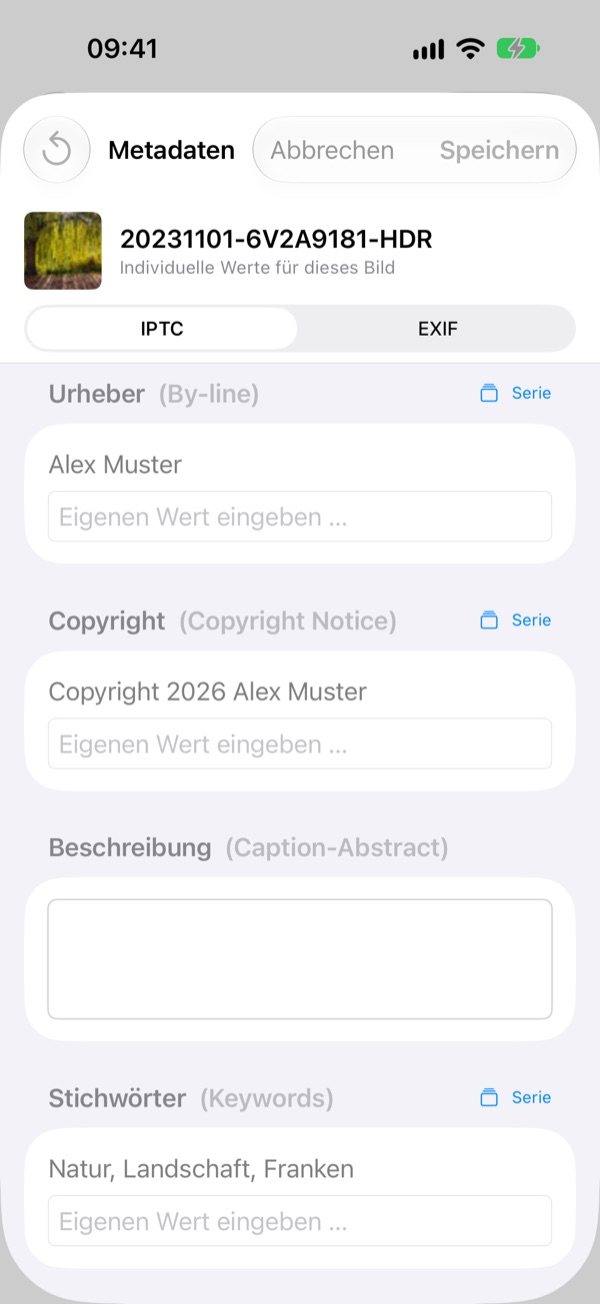
PicDeploy zeigt dir die vorhandenen IPTC- und EXIF-Daten jedes Fotos an und lässt dich Titel, Beschreibung, Fotograf, Copyright und Schlagworte direkt bearbeiten — einzeln pro Bild oder als Serie für einen ganzen Foto-Batch. Auch Anweisungen, Nutzungsbedingungen, Copyright-Status und Kontaktdaten des Fotografen sind dabei.
PicDeploy shows you the existing IPTC and EXIF data of every photo and lets you edit title, caption, photographer, copyright and keywords directly — per image or as a batch across an entire series. Special instructions, usage terms, copyright status and creator contact info are included too.
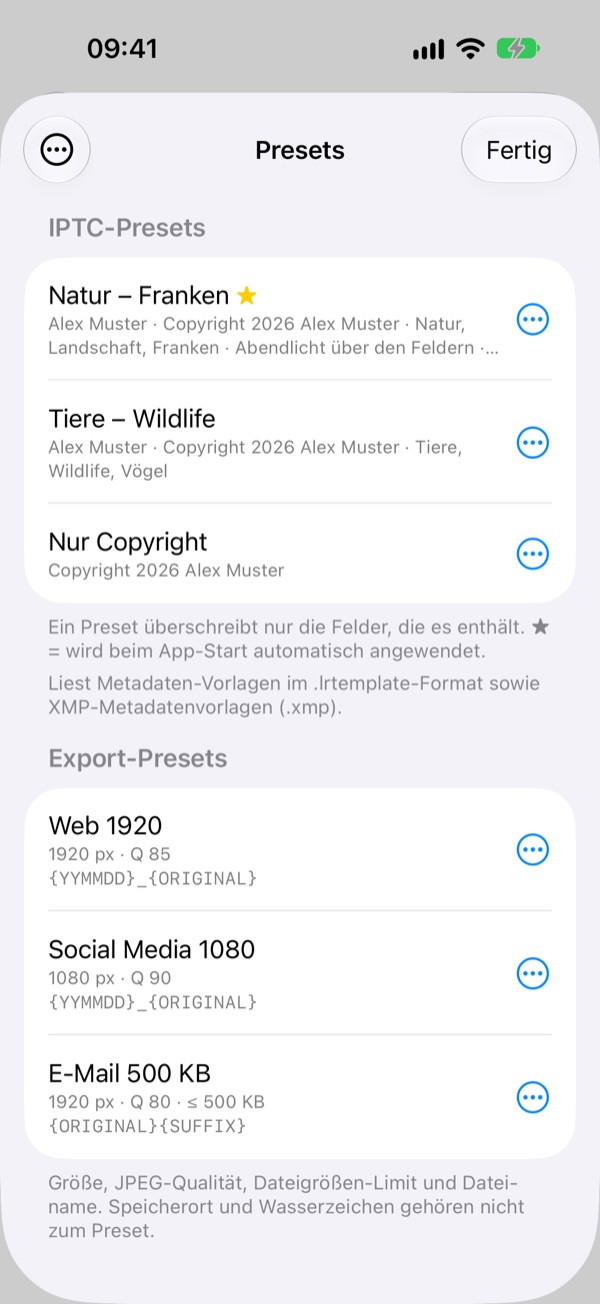
Neu in Version 1.1
New in version 1.1
Presets. Einmal einrichten, immer wieder nutzen.
Presets. Set up once, use again and again.
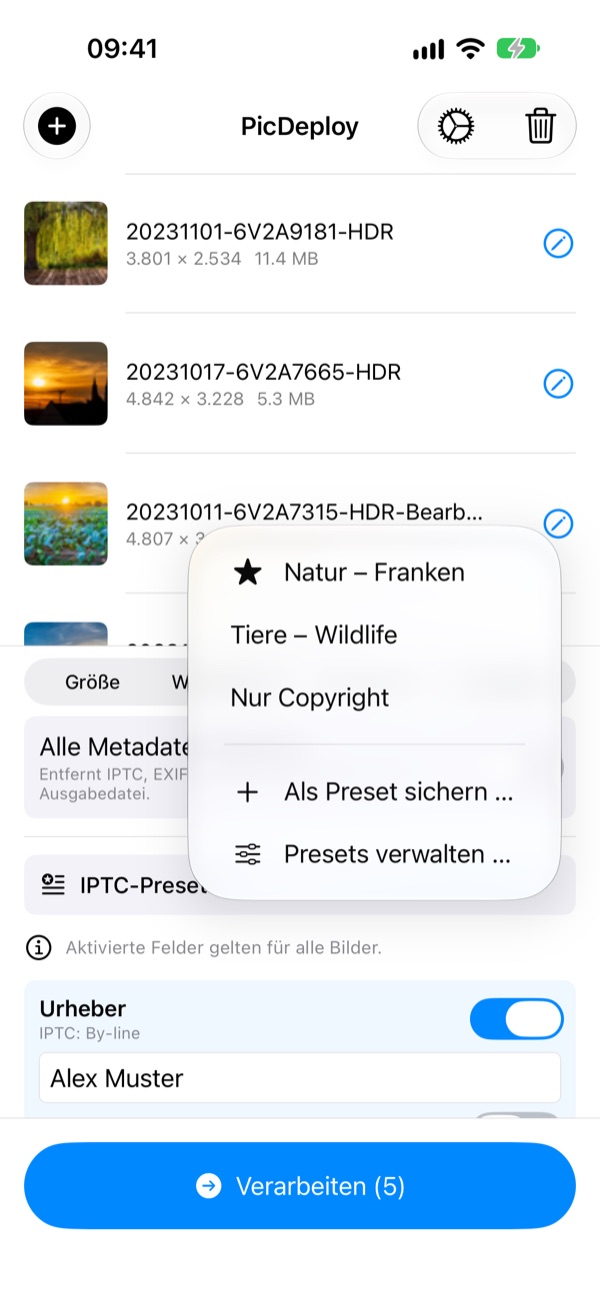
Fotograf, Copyright, Ort und Schlagworte als IPTC-Preset sichern und mit einem Tipp auf die ganze Serie anwenden. Export-Presets merken sich Größe, Qualität und Dateiname — und deine letzten Einstellungen bleiben auch nach einem Neustart erhalten. Vorhandene Metadaten-Vorlagen im .lrtemplate- und XMP-Format lassen sich importieren.
Save photographer, copyright, location and keywords as an IPTC preset and apply it to the whole batch with one tap. Export presets remember size, quality and file name — and your last settings are kept after a restart. Existing metadata templates in .lrtemplate and XMP format can be imported.
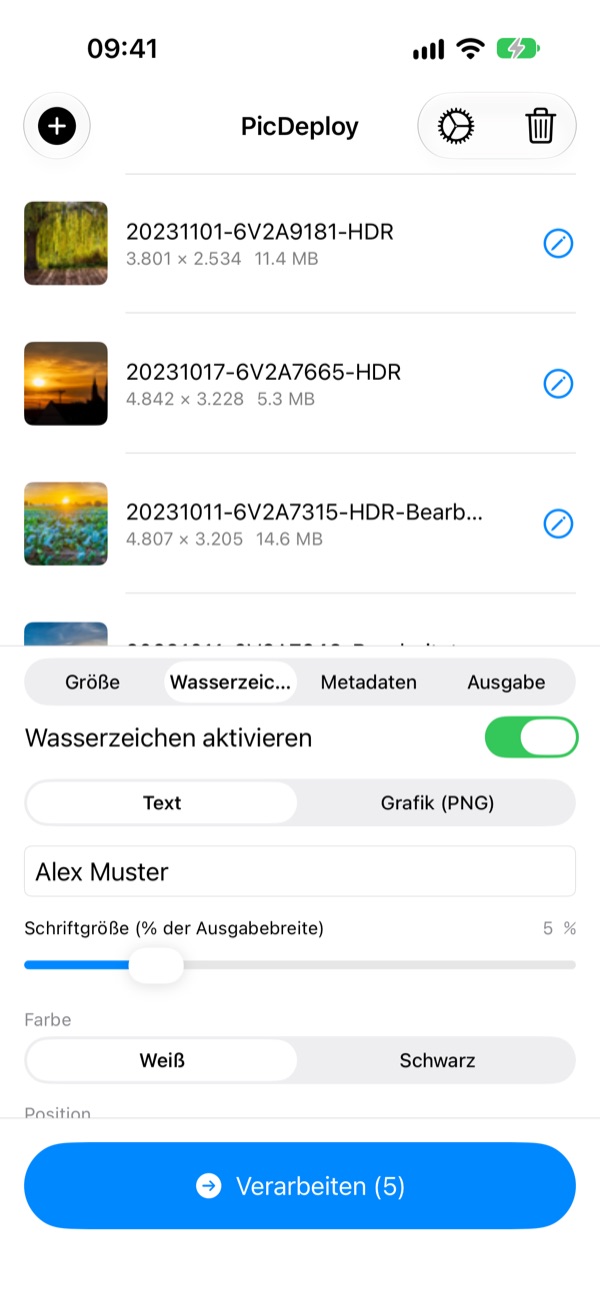
Wasserzeichen & Größe, in einem Schritt.
Watermark & resize, in one step.
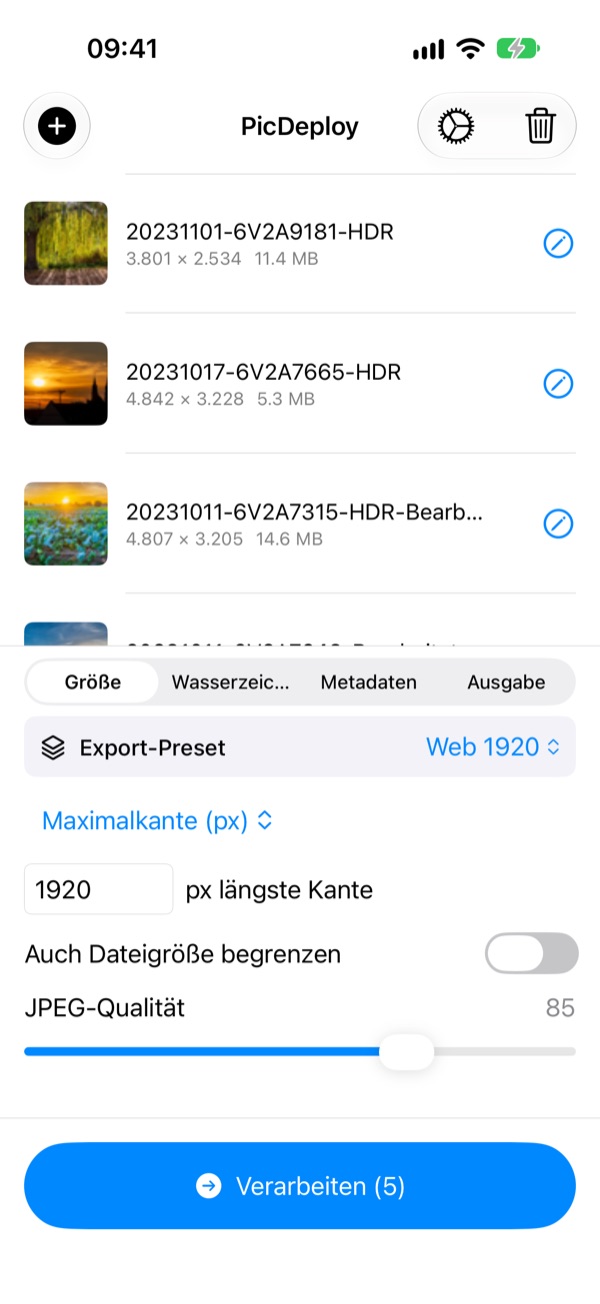
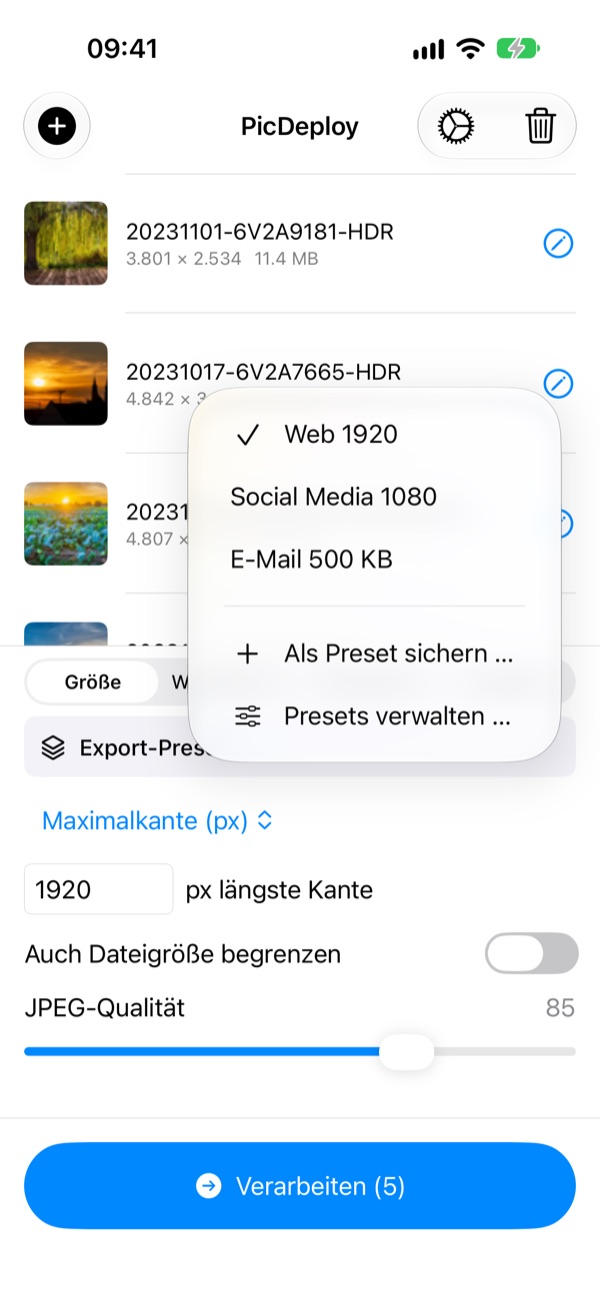
Text- oder Bild-Wasserzeichen mit frei wählbarer Position, Deckkraft und Größe. Gleichzeitig passt PicDeploy die Bildgröße an — nach Maximalkante, Prozent oder maximaler Dateigröße.
Text or image watermarks with freely adjustable position, opacity and size. At the same time, PicDeploy resizes your images — by max edge, percentage or maximum file size.
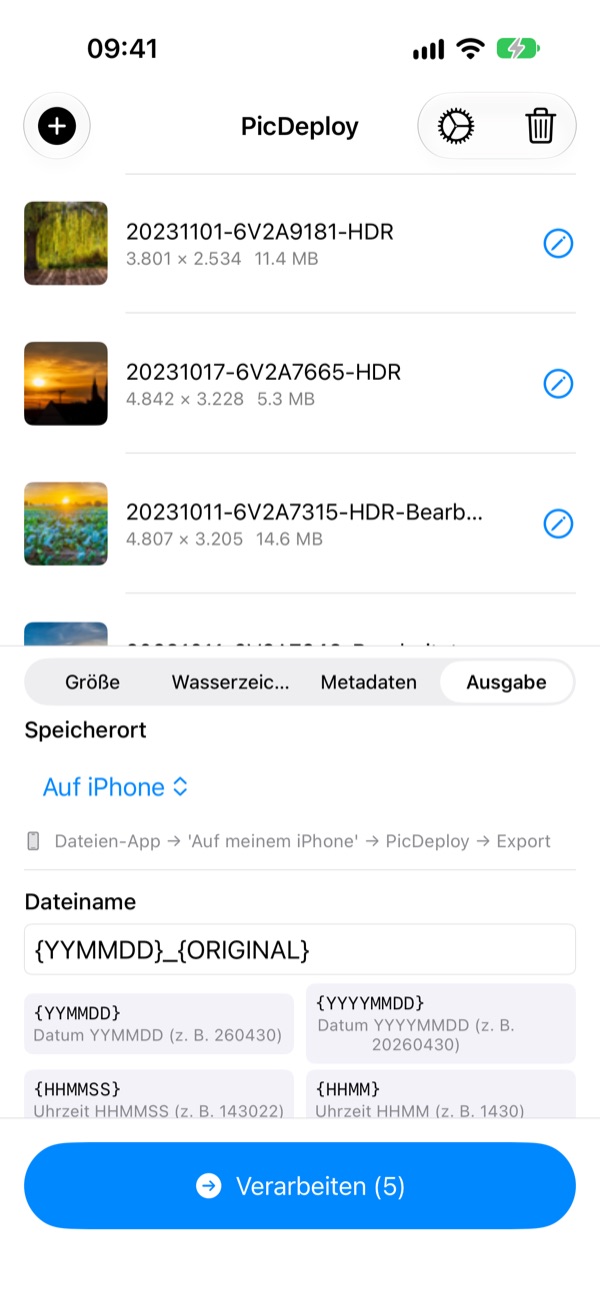
Export, wie du ihn brauchst.
Export, the way you need it.
Speichere auf dem Gerät, in iCloud Drive oder einem eigenen Ordner — deine Originale bleiben dabei unangetastet. Mit frei konfigurierbarer Dateinamen-Vorlage inklusive Token für Aufnahmedatum, Originalname, laufende Nummer und eigenen Zusatz.
Save to your device, iCloud Drive or a custom folder — your originals stay untouched. With a fully configurable file name template including tokens for capture date, original name, running number and a custom suffix.
iPad
iPad
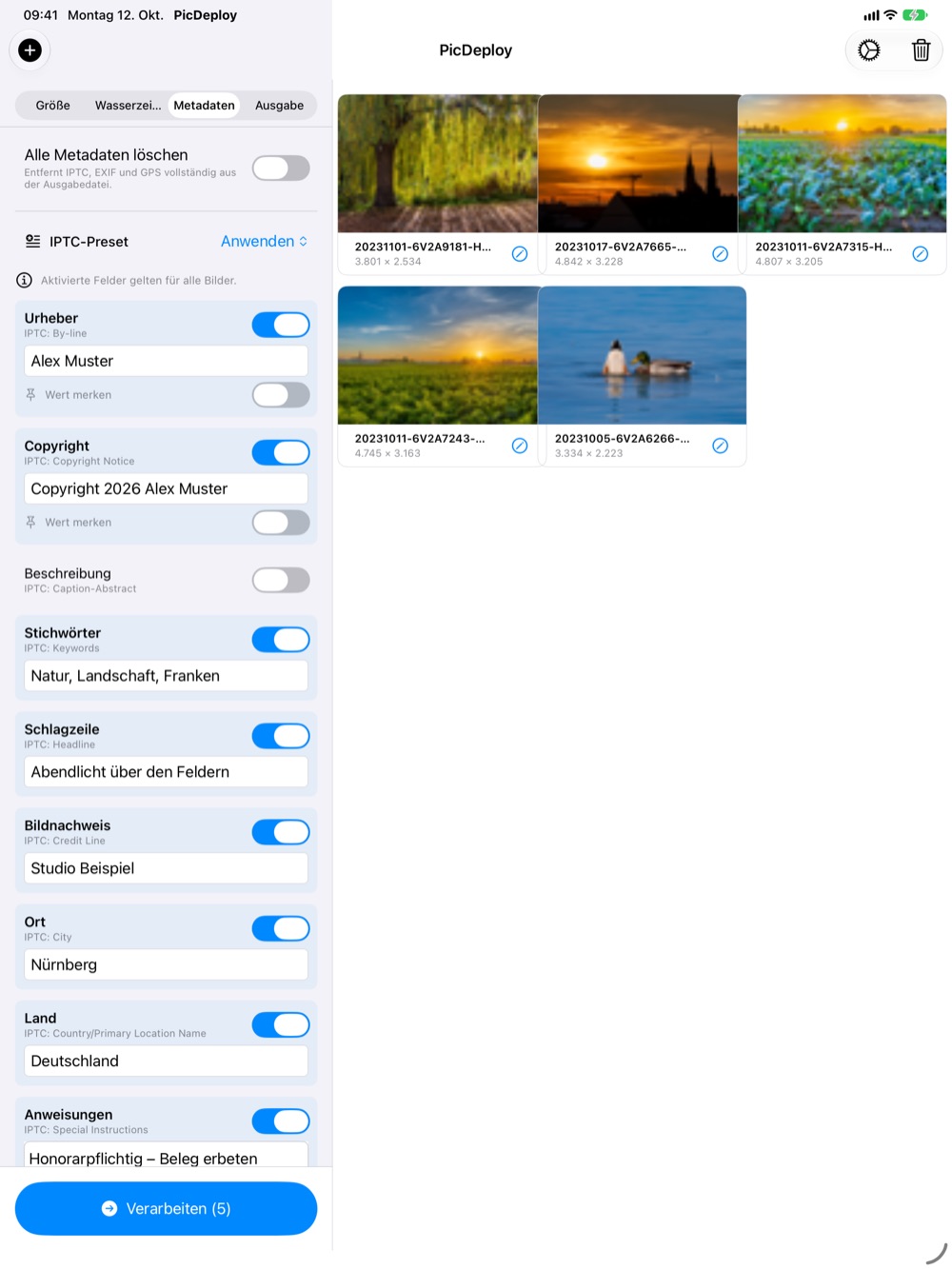
Auf dem iPad alles auf einen Blick.
Everything at a glance on iPad.
Einstellungen links, Bilder rechts — mit viel Platz für die vielen IPTC-Felder. Ideal, um nach dem Termin am Pressetisch oder im Hotel die ganze Serie durchzugehen.
Settings on the left, images on the right — with plenty of room for all those IPTC fields. Ideal for going through the whole series at the press desk or hotel after the shoot.
Screenshots
Screenshots
Ein Blick in die App.
A look inside the app.
Zum Durchblättern wischen oder die Pfeile nutzen.
Swipe or use the arrows to browse.
Alles auf dem Gerät
All on your device
Kein Upload, kein Server. Deine Bilder verlassen das Gerät nur, wenn du sie exportierst.
No upload, no server. Your images only leave the device when you export them.
Kein Konto, kein Tracking
No account, no tracking
Einfach installieren und loslegen — ohne Anmeldung und ohne Analyse-Dienste.
Install and go — no sign-up and no analytics services.
Originale bleiben
Originals stay intact
PicDeploy exportiert neue Dateien — deine Ausgangsbilder werden nicht verändert.
PicDeploy exports new files — your source images are never modified.
iPhone & iPad
iPhone & iPad
Eine App für beide Geräte, auf Deutsch und Englisch. Ab iOS 17.
One app for both devices, in English and German. iOS 17 or later.

Kein Mac.
Keine Profisoftware.
No Mac.
No pro software.
Nur dein iPhone oder iPad — und Bilder, die mit korrekten Metadaten beim Empfänger ankommen.
Just your iPhone or iPad — and images that arrive with correct metadata.
Im App Store laden Download on the App StoreFür iPhone & iPad · iOS 17+
For iPhone & iPad · iOS 17+